

Guide to creating AI generated video:
Is it a useful tool? We find out.

Whilst conducting research for delivering a class on digital marketing, I came across a new app/website called PiKa In the description of the app, I was sold the possibility of creating AI-generated animations using textual prompts; much in the same way that you would create content with OpenAI's ChatGPT. Fascinated by the prospect of becoming an amateur animator I investigated the potentiality of the application.
This blog post explores that investigation and answers the questions, "Is it worth it?", "Is it useful?" and "Is it fun?".
The answer to all three questions to some extent is yes; but it depends on the intent of the creator as the application in its current form has some serious and obvious limitations.
(If you’ve like what you’ve read so far, why not subscribe today for more tech and entertainment related articles?)
The interface
The interface of Pika is intuitive and user-friendly. Its layout is straightforward, allowing even those with minimal technical expertise to navigate with ease. The main feature is the text prompt box, similar to ChatGPT, where you input your creative ideas. The interface also includes options for specifying the style and length of the animation, which adds a layer of customization to your projects.
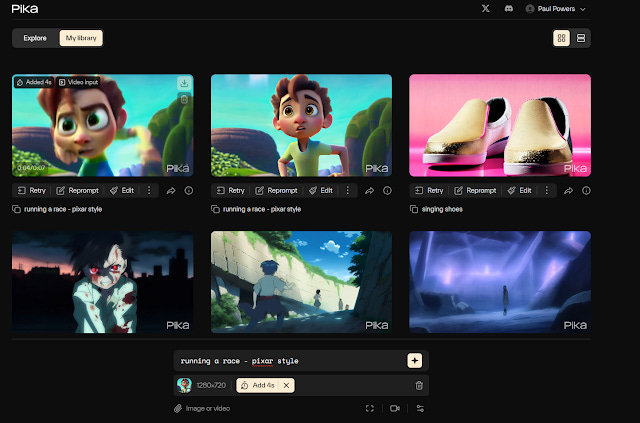
There are no obvious instructions on how to use the app, so if you aren't afraid of exploring and making mistakes then you will do just fine. As you can see in the image below the interface is simple, black, well laid out and has clear and familiar icons that provide indicators to users on how to get started. Starting from the top left, I will now describe each aspect in some detail.
The first feature/button you encounter is the main page link icon which is the webpage's name (Pika) click this to refresh the page or to return to the explore library. In the explore library there is a selection of works completed by other people that you can view, regenerate or share. More on that later.

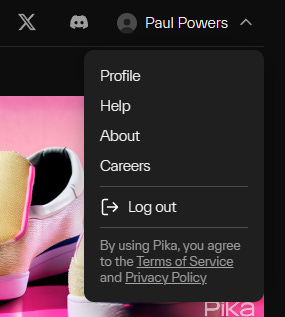
To the right of the main page link icon are two shareable links X (formerly Twitter) and Discord. When clicked takes you to the X page for Pika and the Discord server for Pika (see below for what they look like). Continuing right of the Discord icon is the account icon with your username and a down-arrow which opens a small menu with important options related to your account management.

In the image below you can see the extended account menu options which include Profile, Help, About, Careers and Logout. There are also links to the Pika Terms of Service and Privacy Policy.
In the two images below, you will see the next set of options on the interface. On the left you have a toggle button which allows you to view the Explore menu which contains videos generated by other people, handy if you're looking for inspiration.

On the right of Explore is the My Library toggle button which takes you instantly to your personal video library collection.

As expected, the buttons are responsive and easy to use, and you can click back and forth between the two windows easily and without error. To the right of the Explore/My Library button you will find another toggle button.
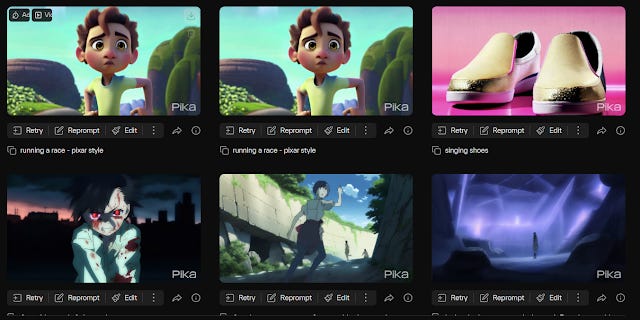
This one contains the setting for how you wish the libraries, public or private, to be laid out. The button with four small squares lets you stack your videos up in rows of three, the other icon (looks like a hamburger) makes the video thumbnails much larger and plots them one on top of the other, like layers in a cake/burger. My personal preference is the default option of four-squares as it makes it easier for me to view multiple videos at once. This can be handy if I am generating videos that are reliant upon a continuing narrative or theme. It makes it easier and quicker to view the incremental changes being made.

You can see the result of selecting the layering approach to the layout below:

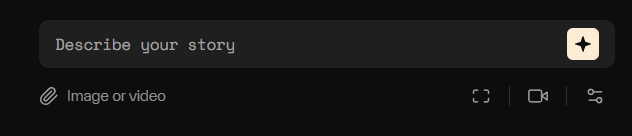
The image below shows the main control which is located at the bottom of the screen. It seems awkwardly placed and could do with some framing to make it stand out more. This is after all the most important part of the Pika app/website. This is your text input, your chance to input your prompts, as you would with ChatGPT to try to gain the output of your desire.
If you like the article so far, why not give it a share?
Limitations
I found that there is a limit of around 440 characters which limits the detail or instruction that you can enter. However, whether or not you put one word or a dozen words, the results are highly unpredictable, seemingly completely random, and underwhelmingly uncontrollable. This is disappointing as a creator looking to use this tool to generate some original animated content is really limited by the black box and the magic coding hidden within it. By not giving users more agency on how a video turns out I think that Pika are missing a valuable opportunity here. It may be that due to the app being quite new at the time of this review that in coming years an increased level of functionality and adaptability may be introduced.
Another limitation is the 3-second time limit. This means that although a user can create unique original and inspired content, the duration limits it to nothing more than a flicker on a banner, or a tiny repeating GIF file. Yes, if you want to it is possible to add another four seconds to the video, but this requires a regeneration, and the results may vary. So, just like war, huh, we are left asking, "what is it good for?". I asked my AI friend ChatGPT and here is what it told me...
User (that's me)
"What is Pika good for? What can these 3-7 second videos be used for? Is this a useful app/tech?"
ChatGPT
"Pika, with its capability to create short 3-7 second videos, can be a versatile and valuable tool in various contexts. Here are some potential uses for these brief video clips:"
Social Media Engagement: In the fast-paced world of social media, short videos are perfect for capturing attention. They can be used for eye-catching posts, stories, or advertisements on platforms like Instagram, Twitter, and Facebook.
Digital Marketing: Brands can use these short animations for online advertising, especially for products or services that can be showcased effectively in a few seconds. They can serve as teaser clips, leading viewers to longer content or a website.
Educational Content: Educators can use these videos to illustrate complex concepts quickly or to provide visual summaries of topics, making learning more engaging and memorable.
Website and App Enhancements: Websites and mobile apps can use these animations to improve user experience, such as loading screens, introductory clips, or interactive elements.
Personalized Messaging: For personal use, these videos can be a fun way to send unique and creative messages to friends and family, or to personalize digital invitations and greetings.
Art and Creative Projects: Artists and creators can use Pika to experiment with animation, create storyboards, or develop visual art projects.
Product Demos: For businesses, these short clips can be an efficient way to showcase product features or demonstrate how a product works.
Regarding its usefulness, Pika's utility largely depends on the needs of the user. For those who require quick, simple animations without the need for detailed or complex storytelling, it can be an extremely useful tool. Its ease of use and the speed at which content can be created make it particularly appealing for rapid content generation. However, for more intricate or high-quality animation needs, its limitations might be a drawback. Overall, Pika is a promising technology, especially in contexts where brief, engaging visual content is valuable.
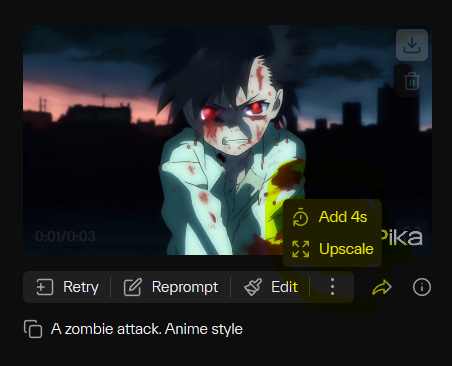
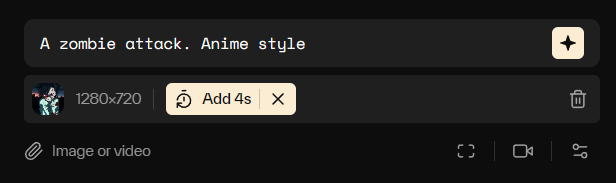
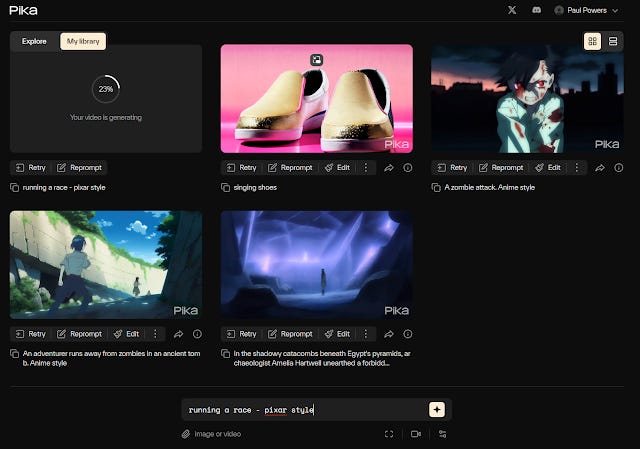
Here you can see the process for adding four more seconds to your initial three second clip. First, you select the three dots, highlighted in the image above. Next you click add 4s, then you regenerate the video at the bottom of the page. You can see in the image below there is a new option that has appeared. There doesn't seem to be a pro version or a premium upgrade that can extend the total duration of individual clips beyond 7 seconds, but maybe this will come in the future. The reason behind keeping the duration so short is probably to do with processing capability and power, cost and fair use.
What I think about ChatGPT's point of view
Well, I mostly agree, although I don't see how the content that is generated would be good enough in a professional context other than for a proof of concept.
Taking each point at a time, for social media and casual creators or those looking to try something eye-catching to accompany their social media post, yes, I can see that this might be a nice change from the stock photo or GPT-generated DALL-e image that have overtaken YouTube and LinkedIn over the past month. Where it was easy to be a trailblazer back in the summer of 2023, other users have quickly found the knowledge and the means and have jumped on an ever-widening bandwagon. You can't browse either platform without bumping into AI-generated content without impunity.
For Digital Marketing purposes, I think the applications of the output videos may be limited, but maybe that is because my experience of the application is itself limited. However, as a tool to help educators deliver something fun and unusual to their students, as perhaps an example of early generative AI capabilities then I can see a lot of benefit. The process of trying out and testing new tools is not only beneficial to the growth of the student, but to the teacher as well. As an educator within tech, its essential to be on the forefront of all technological developments, otherwise what are we providing to the students? In the past, in certain colleges I have worked for, teaching computer science from books published in 2007 where references to 2G and 3G were part of the assessed curriculum is not only demotivating but it's downright clumsy and stupid. Of course, the history of computing has its place to provide much needed context to the beginner in the field, but not at the expense of knowledge that is applicable to their future careers. So as an exercise in trying new things, becoming familiar with new developing tools and interfaces and becoming familiar with the nature and results of prompting, an application like Pika is invaluable, even if the results can be a tad iffy and sometimes Lynch-like ala Twin Peaks.
The interface (continued)
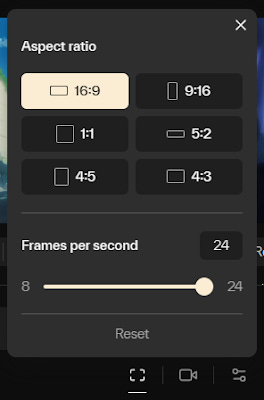
The image below shows the first of three options that are found on the bottom bar. The first option controls the aspect ratio and the frames per second which maxes out at 24fps. 24fps is the standard for animation as this is the refresh rate of the human eye as far as is required to make a smooth looking image on a screen that integrates movement in a realistic and non-jerky manner.
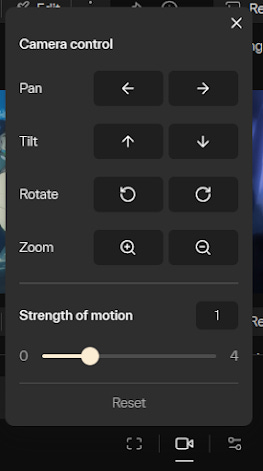
The second option is for the camera control. I'm unsure of what difference this makes currently but I guess that whatever is selected will make the camera move in that way in the end result. I did not test this feature at the time of writing.
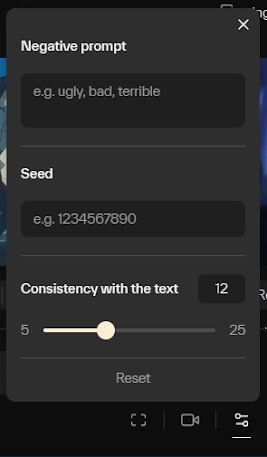
The third and final option window contains the following, Negative Prompt, Seed and Consistency with text. I'm unsure what seed means at this time but the other two options are self-explanatory.
Features
Pika offers a range of features. You can create animations from scratch or use pre-set templates for common scenarios. The ability to adjust the speed, tone, and even the character in your animations provides a decent level of control. However, the range of characters and settings is somewhat limited, reflecting the nascent stage of this technology.
Functionality
Functionality
In terms of functionality, Pika is impressive for basic animations. It can translate simple narratives and concepts into animated sequences. However, for more complex ideas, the output can be hit or miss. The AI struggles with intricate plots or detailed character interactions, which can be a drawback for more ambitious projects.
Output
The quality of the output varies. For straightforward, concise prompts, the animations are smooth and engaging. But with more complex prompts, the animations can sometimes feel disjointed or overly simplistic. It's clear that the AI is still learning to interpret and render nuanced human storytelling.


Videos
The videos created can be easily shared or downloaded. This makes Pika a potentially valuable tool for digital marketing, education, or just for fun. The ability to quickly turn concepts into visual stories is undoubtedly appealing, especially in a social media landscape that favours visual content.
Video 1 (above) - The prompt for the video above was…
“In the shadowy catacombs beneath Egypt's pyramids, archaeologist Amelia Hartwell unearthed a forbidden chamber, awakening a curse. Mummies, guardians of ancient secrets, rose, their haunting moans filling the air. Amelia raced through the labyrinthine tunnels, her heart pounding. Nearing escape, she ascended the crumbling walls, the mummies' grasp inches away. With a daring leap, she emerged under the moonlit sky, her spirit unbroken, ready for her next adventure. Anime style”.
It turned out that this was too long and the application didn’t really apply any of the key descriptors to the animation during processing. The result was a stunted, yet atmospheric attempt at a person stranded in a tomb. You can see for yourself that it was probably the inherit complexity of the prompt that caused the algorithm/s some confusion. Additionally, not all blame can be placed at the digital feet of the app. This was after all, my first time engaging with the app. Since I had become accustomed to working on ChatGPT and with Dall-e either in ChatGPT or on the Bing Image generator from Microsoft I underestimated the capabilities of this technology which is in its infancy.
Video 2 (above) - The prompt for the video above was…
“An adventurer runs away from zombies in an ancient tomb. Anime style”.
Learning about optimal prompt length by looking at what other users had done in the Explore section of the site, I adapted my prompt’s complexity. In this video, you can see many errors or problematic transitions including figures running backwards and blurring. Again the image doesn’t portray the instruction as I prompted. Each video is part of a sequential attempt at using the app so in this case this was my second attempt to make a video.
Video 3 (above) - The prompt for the video above was…
“A zombie attack. Anime style”.
Making the prompt only a few words long this time yielded better results. Although, what we have is a scene out of context and place and time. It has created a stand alone three second clip that could be useful as a GIF, but beyond that, I’m struggling to understand the use or purpose of this app. Is this for making NFTs? It could, I guess. But that then drags us down the road of considering what is art, who is responsible for it, does it having meaning or purpose or use, is it beautiful and did we actually do anything other than pull a trigger to create it. Who is the artist?
Video 4 (above) - The prompt for the video above was…
“running a race - Pixar style”.
My fourth and final attempt was an extended seven second clip. It initially started as a three second clip, but I used the feature to extend it. I was not expecting the result I found. It appears as though the character was “Hulking out!” and although it is funny to watch and there are definite aspects of a Pixar-inspired character there, it is creepy and odd. I’m sure though, that as the technology improves, as has been the case with AI image generation over the past 18 months, that soon enough we will see incredible creation generated from sites and apps such as Pika.
Opportunities
Pika presents exciting opportunities, especially for educators, marketers, and content creators. It can be a useful tool for creating engaging, educational content or for adding a visual flair to marketing campaigns. For creative individuals, it offers a new medium to experiment with storytelling and animation.
Conclusion
To conclude, Pika is a fascinating foray into the world of AI-generated video content. While it has its limitations, its ease of use and the novelty of its output make it a tool worth exploring. It's particularly useful for simple, straightforward animations and has the potential to be a valuable asset in various fields. As AI technology continues to evolve, we can expect applications like Pika to become even more sophisticated and versatile.
In summary, Pika emerges as a noteworthy tool in the burgeoning field of AI-generated content, particularly for those seeking to create concise, engaging video clips. Its user-friendly interface, coupled with a range of customizable features, makes it accessible to both professionals and amateurs alike. While it excels in generating simple animations, the current limitations in handling complex narratives and detailed animations indicate room for growth.
The real power of Pika lies in its ability to democratize video creation, making animation more accessible to a broader audience. From enhancing social media posts to enriching educational materials, the applications of Pika are vast and varied. As AI technology continues to evolve, we can anticipate more sophisticated features and improved rendering capabilities in future iterations.
Pika, therefore, stands not just as a tool for today but as a harbinger of a future where AI-assisted video creation becomes an integral part of our digital storytelling arsenal. It invites us to rethink content creation, opening new avenues for creativity and communication in an increasingly digital world.
Article History
How we reviewed this article:
Our experts continually monitor the technology, computing and professional development educational space, and we update our articles when new information becomes available.
Current Version
JAN 03, 2024
Written By
Paul Powers